Saturday, March 31, 2007

Cheap WiiKey to Play Backups on Your Wii


A modchip for your Nintendo Wii! The list of features on this are pretty impressive and the chip is even software upgradeable. At $10.99 this deal is smoking hot. This product typically retails for around $40. It's been noted that this is the same chip as the WiiKey because it's created by the same factory that makes the genuine WiiKeys, but most likely been placed on a different PCB. Either way it's been tested and supports all the official features of the WiiKey and can be upgraded with updates from the WiiKey site.

* Direct boot of wii backups
* Direct boot of GC backups
* Direct boot of homebrew in GC mode
* Supports all currently available console/drive versions
* Supports D2B chipsets
* Sophisticated (true) update mechanism via DVD (future proof, expect cool features to come)
* Direct boot of different NTSC region Wii games/backups on US and JAP consoles
* Partial support for NTSC region Wii games/backups on PAL consoles
* Boots different region GC games/backups (partially without swapping)
* Supports multi-disc games for BOTH Wii and Gamecube
* Supports DVD-R / true DVD+R and +RW support (no bitsetting required!)
* Improved readsettings for recordable media
* Built-in audio fix
* Supports fullsize 4GB discs for gamecube homebrew
* Stealth mode
* 512 byte EEPROM to store configuration
* Quicksolder interface - no wires required
* Unique disc backup application via sdcard
* Compact design, best quality components, rock solid high speed controller
* Professional ESD packing
* Recovery mode - Can recover from a bad flash


Via FatWallet

The 25 Worst Rapper Names of All Time

Do the ditty if you, want to. Because then I can see if I want you.


There's some I haven't even heard of, and some just make me want to say, "Come on now, please tell me you said that name out loud to yourself before you started saying it to others." I love the juxtaposition on some of these pics.


Via CRACKED.com and Kathy

Friday, March 30, 2007

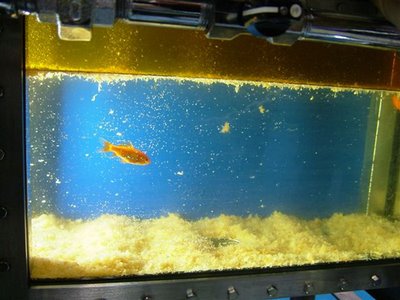
Japanese Deep Fryer with an Aquarium Inside


I love all the great technology that Japan's given us over the years. From heated toilet seats to fancy cars. Now they're created a deep fryer that has the oil sit on top of water. To demonstrate they have goldfish swimming inside, eating at the delicious tempura droppings! Pics and video after the jump.


Via OhGizmo! and Kathy


Powered by ScribeFire.

Thursday, March 29, 2007

ffmpegX

I decided to go ahead and put up a short tutorial on ffmpegX since I'm going to be encoding my slideshow with it. The other project that I finished up already has an mpeg-4 counterpart.

Cliff Notes:
  • Download and Install ffmpegX
  • Choose h.264 mencoder
  • Set video resolution to 640x480 and bitrate to 1185 kbit/s
  • Set audio to AAC
  • 192 kbit/s bitrate, 48000 khz sampling, Stereo channels, VBR mode,
  • Deinterlace if interlaced source
  • Use CABAC, b-frames, two-pass encoding, and UNCHECK Constant bitrate
  • Scaling method: bicubic spline, ME function: Exhaustive.
  • Press "Encode" and come back in an hour.

First thing's first, you need to download ffmpegX. This is a freeware program. You can use it as long as you want without a fee, and you can also choose to register it for a small fee. You don't lose any functionality if you don't register it though.

I'll assume you're new with Mac and give you a couple steps on installing. First download the DMG file. DMG files are Mac's way of creating virtual drives and most, if not all, Mac programs that are downloaded come in DMG form. By double clicking on the file a new drive will appear on your desktop and open up in a window. Here's where it gets a bit different from Windows users. There's no complex install wizard or setup or guide. Installing a program on a Mac is as simple as dragging the icon into your Applications folder. Some programs (Skype comes to mind) even include a link to your Applications folder in the DMG file to make it even simpler. The program will copy itself over and once it's done you've installed ffmpegX. I'm not clear on whether or not Mac maintains a registry of all installed software and such, but from a consumer's point of view, it's all self contained in the APP file.

Drag and drop your original file into the top text box. This will fill in the file name as well as the information on your file in the left boxes under "Source format." My preferred target format is h.264 in an MP4 file. I choose "h.264 mencoder" under the drop down menu. Now it's time for the different settings.

Click to the "Video" tab. Typically I need to reset the resolution back to the original size, in my case 640x480. Under the bitrate calculator are 6 buttons. Rate, Time, Best, Auto, Size, and Img. If you hover your mouse over the button there'll be a short tool tip explaining what each does. The only two I really use are "Best" and "Size." First I'll press "Best" to see what the suggested bitrate is for optimal quality. Now that I have an accurate bitrate I'll press "Size" just to see for my own information approximately how large the file size will be. The bitrate box is probably pretty accurate to set values, but I think the MB box is only used to display values. The Video Bitrate box will display red text if the bitrate level is too low for the resolution, green if it's an ideal value, or blue if it's too high and you've passed the point where you'll gain quality by having a larger file. My "Auto" button usually sets a Video Bitrate of 1078 kbit/s. From testing, I usually find a value of 1185 kbit/s to be the highest setting while still remaining in this ideal portion. Feel free to play around with the numbers to see what works best for you. ffmpegX's help page on the Video tab here.

Audio can be just as important as video in a project. To get highest quality at the best compression I use the AAC setting, with the parameters or 192 kbit/s bitrate, 48000 khz sampling, Stereo channels, and VBR (Variable Bit Rate) mode. By using VBR areas with more complex sound are given higher bitrate and room to squeeze in all those sounds, while quiet or empty areas are given less bitrate because it doesn't need it. The actual bitrate will be jumping all over the place during playback, but I feel that this is a more efficient (albeit slower) way to get better quality audio and reduce file size. More info on ffmpegX's page on the Audio tab here.


The only thing you'll need to do on the "Filters" tab is deinterlace if your source video is from an interlaced format such as a DV camcorder. Personally I prefer to deinterlace in the video editor, such as Final Cut. You can pick if the odd or even lines go first and see how it looks afterwards. There's mixed responses about using the deinterlace option with ffmpegX. If your format is interlaced and you're only going to be encoding with it, then you should definitely check this box. More info here.

The most confusing tab is most likely the "Options" tab. Everything I choose here results in higher quality/longer encoding times/smaller files. Any and all of the above. I haven't actually spent time encoding it in fast and easy method and compared quality and file size to comprehensive approach I take. It's not like I can't do other things while I encode (as long as they don't take up too much CPU! You don't want to mess things up while encoding), such as chat or surf the web, so I choose the most exhaustive approach for that bit of extra quality. It's worth it to me. I check the options Use CABAC, Use b-frames, and Two-pass encoding. Also to note I UNcheck Constant bitrate, for the same reason I use variable bitrate in audio. CABAC allows improved encoding and small file sizes at a price of time. B-frames reduce the file size. Two-pass encoding allows it to encode once to first calculate the bitrate statistics, then use that information for optimal settings during the second and final pass. For scaling method I choose "bicubic spline." I'm fuzzy on what these exactly do, but this is what the website says:

Selects the algorithm used to resize the image. Choose the default "fast-bilinear" when speed is important. For better image quality but slower encoding, you can choose either Bicubic (best for upscaling, ie scaling to a larger size), Bilinear (best for downscaling, ie scaling to a smaller size than source), Lanczos, or Bicubic spline (sharp picture).


I usually just set it to Bicubic spline because I'm encoding it at the same size. It's just my all purpose setting. For the ME function I choose "Exhaustive." For more info on the Options tab check out their page here.


Well, those are all the settings that I personally use. If you have different settings you like more then let me know.

Free Magazines and 30%-40% Off Foot Locker

Get up to 4 free years on a single magazine. Some only allow 1-2 years, test them out and see. You can go back and order another magazine, but only one magazine per order for free.

Here is your chance to get 1 year of any of the following magazines FREE !!!

* Latina
* Maxim
* Working Mother
* Shape
* Stuff
* Blender
* Seed Magazine
* Computer Shopper
* Muscle & Fitness
* Western Interiors
* Ebony
* Jane Magazine
* Travel & Leisure Golf
* Jet

Pick the one you like, add it to your shopping cart, then apply coupon code
1free when you checkout.
(Limit one FREE magazine subscription per customer)

Now the bad news:
The site is getting HAMMERED by everyone and their mother!! So please try over and over until you get it. Dont give up!!

http://magsforless.com/1free.cfm?

Enjoy!!!


Via Club Lexus forums Update! Eric let me know that Stuff and Maxim work for 4 years. I think I have Stuff and Maxim until 2017.... I guess it'll be 2021 now.


Foot Locker Friends & Family employee discount of 30% off your entire purchase at all Foot Locker stores and online. An additional 10% off in-store if your purchase after discount before tax comes out to be $100 or more. My handy dandy calculator and I come up with a total of at least $142.86 if you want to take advantage of the extra 10% off. Some restrictions apply. I actually do need to get some new kicks. I always seem to get calluses when I play basketball. I still want the KSwiss shoes though. I'll post a link later to the ones you can customize with your own colors and text.


Via Foot Locker

Thanks to David for pointing me to both!

Wednesday, March 28, 2007

Best Quality Slideshow Using Mac's iLife Suite

I'll try to summarize this so you can get the best quality slideshow on your new fancy Mac with products that are included with your system. Causes of poor quality in iMovie could've been due to the fact that it was exporting the file using a DV codec, which looks very bad due to interlacing on computers. I haven't tried going back with iMovie and exporting the so-so quality video with other settings to see how it comes out. Good quality video exported with good settings resulted with a great quality video.

Create a slideshow in iPhoto by creating an album with the pictures you want, then simply press the "Slideshow" button. Check your slideshow settings and set your resolution to 4:3 if you're going to be exporting this to iDVD for burning, otherwise just turn on "Automatic Ken Burns Effect." You'll get a high quality slideshow with nice panning and zooming without having to tweak the motion path and zoom settings for each individual photo. Default settings should also include a dissolve transition between photos. I prefer to have complete control over my photos, so I manually turn on Ken Burns Effect for each photo and use the zoom and start and end settings for each photo. By setting the start and end locations iPhoto will automatically create the motion path and timing to connect the two. You're basically creating keyframes that iPhoto knows how to handle. At this point you could add a soundtrack and make iPhoto stretch or shrink your slideshow to fit your soundtrack. If you want each photo stay display longer than the default 5 seconds you can select all the photos and change the setting to your desired length. Once you're set go to File -> Export and choose the resolution for the slideshow.

Now you can import the file into iMovie if you want to add a soundtrack, titles, or chapter markers for iDVD (or any other DVD burning program). I created a new project with a type of "Mpeg-4" since the properties of my QuickTime file said it was encoded as an mpeg-4. If you're going to export this and only share it via your computer, then you're all set. If you go to Share -> Share you can choose to compress for Full Quality, but it'll come out as a DV file, and result in less quality. Instead, choose Expert Settings. Export it as a QuickTime Movie, and then choose the specific options. Choose Compressor setting H.264. You want to make sure the video encoding is set to best and multipass; it'll take longer, but it's well worth it. For audio settings I choose AAC, best quality, variable bit rate, and 192kbps. It'll probably take half an hr to an hour to encode depending on the slideshow length. Your file will probably be very large (mine ended up being 1 gig). If you want to share the file then you'll probably need to encode it again to shrink it down a bit using an encoder such as ffmpegX. I'll make another post another time about the ffmpegX settings I use, but you'll get 150MB or so for every half an hour.

If you're going to import your slideshow into iDVD then you don't even need to mess around with export settings. iDVD can take iMovie project files as media. iMovie project files will have a small iMovie icon in the lower right hand corner of the poster frame. This'll import the slideshow without any loss of quality due to previous encoding. iDVD will need to encode these files into mpeg-2 to be playable on the DVD anyways. Then just do your stuff as you normally would with iDVD and you're all set!

I'm listing these steps from memory, so if anything that's unclear or mistaken let me know =)

Rent a Lotus Elise from Enterprise

Lotus Cars USA, Inc., the exclusive distributor for Lotus sports cars in the United States and Canada, announced today the addition of Enterprise Rent-A-Car contracting for an initial fifty (50) Lotus Elise exotic sports cars. These particular vehicles are being targeted for the following markets: Las Vegas, Los Angeles, San Diego, San Francisco, and select South Florida locations.

In response to the extraordinary popularity of the stunning Lotus Elise exotic sports car here in the USA, rental fleets across the country have, for the first time ever, begun ordering cars for their customers under various exotic car rental programs.

Pretty sweet, I wouldn't mind renting a Lotus for a weekend. The article doesn't mention anything about the price though.

Via The Auto Channel and Eric

Done!

Still wasn't as easy easy as I had hoped it'd be. After I was finished fixing up the audio track back to how I had it before I did an export at fully quality.. which took about 10 minutes. It should've been around 400MB or so, but the prompt said it'd be around 120-180MB, a little fishy. Nevertheless I exported and then opened it up to check it out. QuickTime error! Cannot open. Great... Changed the export setting to DV Stream, progressive scan since the video wasn't interlaced. This took another 10 minutes. The resulting file was 1+ GB, which is probably about right for a DV encoded file.

Nice, it opened up and played. The quality suffered and it was quite noticeable that the resulting video file was now interlaced. Shouldn't be that big of a problem, since I'm going to be using it in an iDVD project sometime. To see if I can get the same quality I see in my iMovie project, I exported it again, this time using QuickTime conversion to encode it using H264, basically a high quality mpeg-4 codec like Divx or Xvid, but with higher quality and lower file size. I really like to get as high quality as possible, so I set all the settings to best as well as a multi-pass encoding. Same thing for the audio. It took.. maybe about 40 minutes to encode it, but what came out was well worth it. I got a mov file that was crisp, had my audio, had my transitions, and I was pleased. The file was 1GB though. I'm sure I can reencode it with ffmpegx to a smaller file size. I might play around with a couple encode settings on different files to see what the best would be for DVD playback and for computer playback. I'm sure I can get the final file size down to under 200MB. I'll do that tomorrow though, good night!

Tuesday, March 27, 2007

AHHHHHH!~!!! Slideshow Rant

It's strange, I've made a slideshow that came out good quality with iMovie before. For some reason now it's crap quality, possibly the iMovie update I got a couple of weeks ago? I could create the slideshow with Final Cut, but that just seems like overkill. I don't need to manually tweak my photos and create motion keyframes for Ken Burns Effect, iMovie has that built in. iMovie turned my 3.2MP digicam pics into webcam quality video. What's up with that???

After scouring the web on the way to create the best quality slideshow with iMovie (or Mac for that matter) I found a site that mentioned creating a slideshow in iPhoto, having all the settings, then sending the slideshow to iDVD, and taking the file it created. Once you have that mov file you can import it into iMovie and create chapter markers or whatever you wanted. My slideshow was 8 minutes long, so I thought that I would create the slideshow with video only, then import it into iMovie and add the soundtrack there.

For some strange reason my slideshow wouldn't import into iMovie!!! RAWR it got some error that said "The file could not be imported: Unknown Error" No explanation given. OK, I'm a solution type of guy.. Let's try Final Cut. I'm importing a mov file just like any other video file I'd use in a project. My Mac created the video file, so Final Cut should be able to use it as a resource. Final Cut allowed me to import it no problem, but the entire video file needed to be rendered. Odd, I thought. It's already a video, and my Mac can play it fine. Maybe it's because it has to render it into DV format. I let it render, which takes about half an hour. Might as well make some salad to eat... I come back, preview it at 100% size and it's smaller and blurrier than the mov file. Weird. Maybe it's just the playback. I export it full quality to my hard drive and compare it with the original. Yep. Quality has worsened. Time for a different approach. I can't mess with the video or I'll get bad quality. Time to turn towards the audio...

I know, iPhoto only supports one song for your soundtrack setting, SO what I'll do is use GarageBand and mix multiple songs into one single file, and use that in iPhoto as a single song. It's the first time I've touched GarageBand, and I see an option to add a score to a video. Great! Sounds like exactly what I want to do. I get my songs, arrange them, cut here, trim there, oh, I want this chorus, maybe a fade here. *whew* ok, I'm all set. Let's add a title at the end. I'll use iMovie to create and export a title, then add it onto the end of the slideshow. Great, GarageBand will only let me replace the file. I guess it's a one video file type of project. OK, maybe an alternative will be to create a title as an image, add it to my slideshow like a regular picture, I can adjust the dissolves and the time it's shown. I'll try that later though, first let's see what it looks like. Export movie. Sounds like exactly what I'm trying to do. Hit export. Wait 10 or 15 minutes. Time to see how well it came out. WHAAAAT?!?!? My slideshow has gone from 720x540 resolution down to 240x180, effectively destroying it. *sigh*

Let's rethink this. iPhoto or iDVD created slideshows seem to give the best quality. Why iMovie comes out so blurry I don't know. I've already created a slideshow ready for music in iPhoto. Maybe there's another way around this. A quick search for "iPhoto Slideshow" leads me to Apple's iPhoto page, and I see there's an export option. Why didn't I look there first, and why did that website I found suggest for you to do a work around export via "Share -> Send to iDVD" option? I have no clue. I decide to take my chances and export via the file menu (File -> Export...) using their large size (640x480) setting. Takes another 15 minutes or so to export. Cross my fingers and roll the dice. Opened up iMovie and imported the video successfully! Nice.

I wonder if the problem was the resolution. The aspect ratio was still 1.333, but maybe iMovie just doesn't like other resolutions *shrug*. Currently working in iMovie. I'm going to have to recreate the soundtrack for the slideshow... let's hope it works >_<

Monday, March 26, 2007

Nikon School

I received this in my email today because I have a Nikon S6 registered with Nikon.com. They have intro for people who are new or thinking about getting a digital SLR and also more advanced information for people who are familiar with digital SLRs.

Nikon School

Sunday, March 25, 2007

Secret Ingredient: Romaine Lettuce! Pt. 2 - Viet Lettuce Wraps


Allez Cuisine!!!


The BBQ Chicken Salad was pretty tasty, but I wanted to try something in a completely different direction this time. If I didn't have Romaine Hearts I probably would've done this with red leaf lettuce. The Romaines taste good, but I think they're just a bit too thin and hard to wrap too well. I had lettuce wraps at this Vietnamese restaurant I went to a couple weeks back with my mom. It was tasty and I decided to replicate it at home. Off to the ingredients~


Julienned Carrots. Basically just carrots cut into long thin strips. I used about 3 medium sized carrots. To make it easier I used my mandoline rather than cutting the strips one by one.


Julienned Cucumbers. About 2 cucumbers worth is what I have here.


My Romaine Lettuce and Cilantro soaking in some cold water to keep it crispy and green. Some people don't like Cilantro, but I think it gives a nice fresh taste to things. Leave it out if you don't like it, or mix in your favorite herb. Green onion works well too. Feel free to experiment, it's not like I made this from a recipe.


Fish paste. People who aren't Asian might not know what this is, but basically it's cooked? fish that's been ground and... pastified. This is also good for making fish balls for soup, but maybe next time (or with leftovers?). The one I had in the restaurant was shrimp paste in a tofu pouch or coating. That was pretty good, but I decided to try it out with fish paste to see how it'd go. It was tasty, but the shrimp version had a stronger flavor. I used saran wrap and made thin patties with it, then pan fried it. After it cooled I cut them into strips.


Sauce. The same type of sauce you'd typically get when you order fried egg rolls in a Vietnamese restaurant. Feel free to use the mix and ratio that Wikipedia gives. I remember a Vietnamese friend telling me basically what was in it a long time ago and just mixed everything to taste. Some fish sauce, more water than sauce, juice of 1 lemon, sugar until I felt it was right, and garlic chili hot sauce. At first I thought the sauce was too salty and spicy, so some more water and more sugar made it just right for me. Make sure to taste things as you go along. It's never too late to add another ingredient here or there to make it taste just how you want it to.


Putting it all together is the easy part. I guess I could've been fancy and made it "deconstructed" on the plate like how they do on Iron Chef, but I already had them in separate bowls so I might as well have it all ready to eat! Overall they came out pretty nicely and it tasted great. Maybe not so fulling, but it's ok, I had ox tail soup with rice afterwards =) If you try any of these things out send me some pix or let me know!

Friday, March 23, 2007

Secret Ingredient: Romaine Lettuce! Pt. 1 - BBQ Chicken Salad


I have a bag full of Romaine Lettuce hearts that I haven't eaten yet, so I thought I'd drop by the supermarket and grab a couple of Chicken Breasts to make some BBQ Chicken Salad.

Ingredients/Steps:


Two Chicken Breasts covered in olive oil covered with ground Mediterranean Sea Salt and Tellicherry Peppercorns from the Malabar Coast of India (at least that's what the Kirkland grinder says! =D )


Cooked about 7 min in a George Foreman Grill


Two Chopped Romaine Hearts that are refreshed in cold water in my Salad Spinner


Chicken Breasts resting on the cutting board along with a halved lemon. By letting the meat rest before you cut into it you let the juices absorb back into meat. If you cut it right after it's finished cooking all the juice will come out, leaving you with a dry piece of meat. Of course, my dad doubted the fact that the chicken could cook so quickly... and commenced poking and prodding all over the chicken with a fork so that was that hah.


Just sliced the Chicken Breasts after 5 min or so.


BBQ Chicken Salad needs corn! Cookie Monster - "C is for coo..orn?" Just a can of sweet corn. Niblets would work well too. Another nice twist would be white corn.


Sliced red onions. I was going to use my mandoline to make some nice really thin slices, but opted for the convenience of a knife and cutting board.


Of course sauces! BBQ sauce and ranch!


Plate however you like =) I gave my dad this one and just threw together another one.


This Jackson Pollock-ish creation actually looked pretty kool haha so I took a pic of it as well =P Chicken is hidden underneath all that stuff. I found some tortilla chips so I crunched a handful and put it on top later on too.

I'll figure something out to make a part 2 tomorrow =P

Wednesday, March 21, 2007

Congrats to Plin!

AccessoryBug's finally got a PageRank! Jumped straight to 2. Nice and congrats! If you wanna check out his fine collection of purses, then feel free to browse his site =)

Lion Head Meatballs


I'd always eaten them, but never knew what they were called in English, or Chinese for that matter. Lion Head Meatballs are a Shanghainese dish that are basically made of large pork meatballs with some napa cabbage and glass noodles, or bean vermicelli. Lion Head meatballs aren't made from Lionhead rabbits Kathy!! After doing some searching the best recipe I found was from About.com. I've used some of their recipes before, one of the most memorable ones is the Green Tea Ice Cream, but that's for another post ;)

INGREDIENTS:

  • 1/4 cup canned water chestnuts
  • 2 slices minced ginger
  • 2 green onions
  • 1 large egg
  • 1 pound ground pork
  • 1 tablespoon light soy sauce
  • 1 tablespoon Chinese rice wine or dry sherry
  • 1 teaspoon granulated sugar
  • Black or white pepper, to taste
  • 2 teaspoons cornstarch
  • 1 pound greens, such as spinach or bok choy
  • 1 - 2 cups chicken broth, as needed
  • 1 tablespoon dark soy sauce
  • 1/4 teaspoon sesame oil, or to taste

As with all recipes, feel free to create some wiggle room for yourself! These are only guidelines. Personally I used napa cabbage because that's what I've had it with more often.


Ingredients... hmm.. check! Time to start! I didn't really measure much, I just eye balled everything. First I took and peeled some of that ginger you see and grated/minced it. After opening up the can of water chestnuts and draining I did some quick slice and dice on it and added it to the metal bowl I set aside. I diced about 2 or 3 green onions and added it in bowl; make sure you watch it first! Poured some soy sauce, to taste of course, into the mix. Added some salt and pepper and some sesame oil (potent great fresh flavor). Then I just added this big chunk of ground pork butt, I probably had around 1~1.5 lbs or so. I opted to go with two eggs and less corn starch. The eggs will actually help bind the meat together, similarly to how eggs help in American meatloaf. Then I added in the some sugar and some cooking wine. I used Japanese cooking wine, but I don't think it really makes a difference. Since I like sesame seeds, I threw a couple in there as well. Now...


Everything's ready to mix!


Mix mix mix and you get this. You can actually see the yellow color from the egg yolks haha. I used those plastic food handling gloves to keep my hands clean, but it didn't really work. Feel free to get your hands dirty though. It could be a great way to relieve some stress. You know those sand stress balls? Yeah, just like that.


I used two spoons to ball up the meatballs, but next time I'll probably just use my hands.


I used a wok and heated some oil to give these meatballs a quick fry on the outside. I used olive oil, since that's the only oil I have at home, but any oil will do. After you let it brown then flip and brown the other side.


Don't worry if they're not fully cooked since you'll be boiling them later on in chicken broth. You just want to get a nice brown on the outside. Obviously I've got some more meatballs coming. The rest were more reasonably sized. The original recipe says to make them the size of tennis balls lol. That's HUGE O_O. Whatever floats your boat though right?


Here's the plate of all the meatballs. The meat part of the recipe really reminds me of dumpling meat, or even shu mai if I wanted to wrap it in egg wrapper and steam it. I could almost eat these just like this hahaha =P


I cleaned the wok up and then boiled the chopped napa cabbage in some chicken broth, sesame oil, salt, and soy sauce.


Time to add the meatballs! After letting it boil for a bit I added more chicken broth and the rest of the napa cabbage.


I turned the heat down to low and let it simmer for about an hour or so, basically until I couldn't wait anymore and was hungry hehe. One last thing I did was put in the glass noodles. I added in some more chicken broth since some boiled away lol.


Then just serve however you like. I personally like this with some hot bean sauce on top of rice. The meat was a bit bland, so that was disappointing. Next time I'll add more salt to the mix. The napa cabbage and noodles were delicious, as they absorbed the porky flavor and the chicken broth. Personally I enjoy my napa cabbage a bit soggy and soft. If you prefer them with a bit more bite and al dente, then I'd advise adding them later in the cooking process. Bon appetite!


Good puppies! They were behaving really well, so they each got some hehe. Enjoy! If there's anything you want me to try or if you have any comments then go ahead and feel free to leave me one =D

Monday, March 19, 2007

Coffee Syphon


Most people don't know about Coffee Syphons, or Vacuum Pot coffee makers, but it's one of the best ways to enjoy a great cup of coffee. I've never had naturally sweet coffee, but apparently coffee connoisseurs say that coffee is actually a SWEET beverage. You just need to use freshly roasted and ground beans apparently. O well... I see coffee syphons being used all the time on anime so I wanted to try one out. Who wouldn't want a kool glass coffee maker with crazy designs like some chemistry kit?? The first time I went to Beijing I came across a Japanese coffee syphon at a department store and knew I had to have it. I think it came out to be around $80 USD or so. Pretty pricey for a coffee maker, but it was something that I'd always wanted and I love kitchen gadgets.

Basically there are two globes made of heat resistant glass. This glass is made to take open flames without shattering, but the caveat is that the glass is quite brittle so care must be taken when used. The lower globe is filled with hot water (key is hot), while the top globe has a cylinder coming down that combines with a rubber stopper to create an air tight seal. A cloth or glass filter is used at the top and grounds are put in.


Using an alcohol lamp (denatured alcohol from Shermin Willians as fuel) The coffee syphon is heated to begin the brewing process. As the water heats it creates steam. Since the lower globe is air tight this creates greater air pressure and pushes down on the water, which then forces the water up into the top globe. This process could take 5-10 minutes or so, or even LONGER if the water isn't hot. You can see bubbles forming in the lower globe in the picture.


Once the water climbs all the way to the top you just mix the grounds and hot water for about a minute or so. Longer than that and it won't extract any additional flavor from the grinds.


Cap the alcohol lamp and let the water flow back down to the lower globe. As the bottom half cools, the steam condenses and becomes water, which reduces the pressure and creates a vacuum or a suction effect. The water is not flowing down only with gravity, it's actually being sucked down through the filter.


Once all the coffee is in the lower globe simply rock the top back and forth and slowly remove the upper half. What you're left with is coffee that tastes as good as it smells. Coffee syphons are known for delivering extremely aromatic coffee that tastes very pure. It's been a while since I've used mine due to the convenience of the drip coffee maker, but I was pleasantly surprised by the fact that it tasted like my coffee had gone through a filter. It pretty much felt like I was drinking water. I wasn't left with any filmy taste in my mouth after drinking it, and it had a nice light robust flavor to it. Of course they say that if your beans are no good, then a coffee syphon is probably the worst thing to use. There'll be no masking of the flavor of the roast and you'll only be left with the poor tasting coffee due to poor beans. The two main reasons they say that this method produces superior coffee is because of the vacuum filtration and also the ideal coffee brewing temperature. You'll notice that the coffee doesn't brew in boiling water. The water temperature is actually just under boiling because the water vaporizes and pushes the water up before it get a chance to boil. It stays in an equilibrium at that temperature by the design pressure design. I just drank mine with some sweetened condensed milk.


P.S. That Grey Poupon bottle smelled like..well Grey Poupon. I used some vinegar and water to get rid of the smell (lemon works really well too) and then decided to not waste the vinegar I'd already poured. I ran the vinegar and water mixture twice through my drip coffee maker to clean it out and remove any nastiness it might have. This also works well on the hot water heaters most Asians have. I made some Lion's Head Meatballs on Sunday, I'll post the pics and do a write up maybe tomorrow after work.